> ## Documentation Index
> Fetch the complete documentation index at: https://docs.aichanakya.in/llms.txt
> Use this file to discover all available pages before exploring further.
# Activity Logs
> Search organization events, interpret each field, and investigate changes without exposing sensitive data.
# Review activity logs
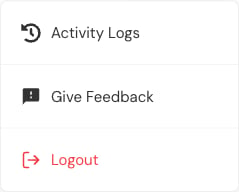
Open the profile menu and select **Activity Logs**.
 Use the search field to narrow logs by user name, email, or event details.
 Each row contains the actor, role, event details, and timestamp.
 ## Investigate an event
1. Record the approximate time and reported symptom.
2. Search the affected account, section, or assessment.
3. Confirm the actor and role.
4. Read the event description.
5. Compare the timestamp with the report.
6. Open the current record and verify its state.
## Interpret carefully
* An event records an action, not necessarily the complete business outcome.
* Several related events can belong to one workflow.
* A password event should not reveal the password.
* A content-processing event can be followed by another status event.
* Time display follows the interface's configured locale and timezone.
Activity logs can contain names, identifiers, assessment titles, and operational details. Share only the minimum excerpt required with authorized support.
## Related topics
- [Sections & Activity](/admin-guide/sections-and-activity.md)
- [Administrator First Steps](/getting-started/admin-registration-workflow.md)
- [Support & Account](/admin-guide/support-and-account.md)
- [Administrator Guide](/admin-guide/overview.md)
- [Welcome](/index.md)
## Investigate an event
1. Record the approximate time and reported symptom.
2. Search the affected account, section, or assessment.
3. Confirm the actor and role.
4. Read the event description.
5. Compare the timestamp with the report.
6. Open the current record and verify its state.
## Interpret carefully
* An event records an action, not necessarily the complete business outcome.
* Several related events can belong to one workflow.
* A password event should not reveal the password.
* A content-processing event can be followed by another status event.
* Time display follows the interface's configured locale and timezone.
Activity logs can contain names, identifiers, assessment titles, and operational details. Share only the minimum excerpt required with authorized support.
## Related topics
- [Sections & Activity](/admin-guide/sections-and-activity.md)
- [Administrator First Steps](/getting-started/admin-registration-workflow.md)
- [Support & Account](/admin-guide/support-and-account.md)
- [Administrator Guide](/admin-guide/overview.md)
- [Welcome](/index.md)