> ## Documentation Index
> Fetch the complete documentation index at: https://docs.aichanakya.in/llms.txt
> Use this file to discover all available pages before exploring further.
# Assessment Oversight
> Filter tests and homework, interpret status, recover deleted work, and prevent accidental permanent deletion.
# Oversee tests and homework
Admin access provides organization-wide assessment visibility. Open **Tests** or **Homework** to search by title and narrow the list by class, section, subject, type, or status.
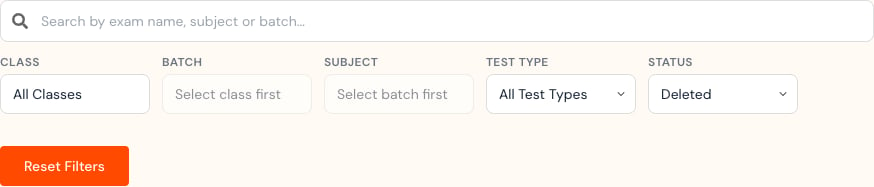 The Test list shows the assessment, class, due date, submissions, status, and available actions.
 ## Understand the default deleted view
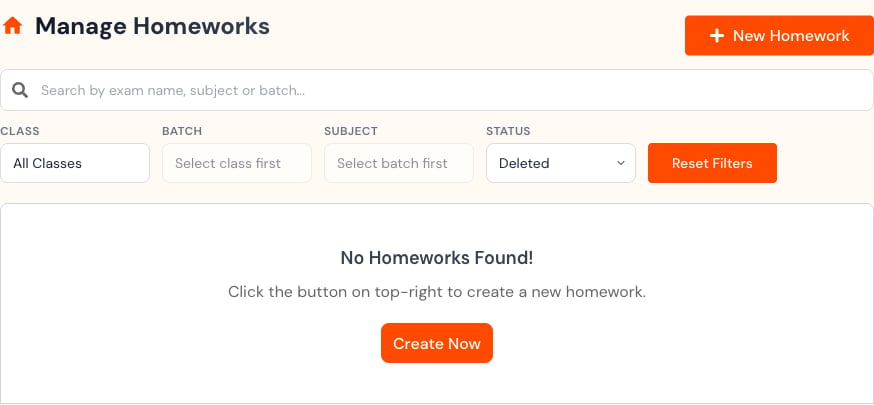
The Admin Test and Homework pages can open with the **Deleted** status filter selected. Change **Status** to **All Status** when you need to review active work.
An empty deleted view means no matching deleted items were found. It does not mean the organization has no homework.
## Understand the default deleted view
The Admin Test and Homework pages can open with the **Deleted** status filter selected. Change **Status** to **All Status** when you need to review active work.
An empty deleted view means no matching deleted items were found. It does not mean the organization has no homework.
 ## Recover or permanently delete
Deleted Tests can expose both **Recover** and **Permanently delete** actions.
## Recover or permanently delete
Deleted Tests can expose both **Recover** and **Permanently delete** actions.

 Use **Recover** when the item should return. Before permanent deletion, confirm:
* The exact assessment.
* Its owner and class context.
* Submission count and grading state.
* Reporting or audit requirements.
* Explicit authority to remove it permanently.
Permanent deletion can be irreversible. Do not use it as a cleanup shortcut when recovery, filtering, or a status correction would solve the problem.
## Create homework
When enabled, select **New Homework**, choose class, section, and subject, set the duration, and upload the required question-key PDF. An answer-key PDF is optional.
Use **Recover** when the item should return. Before permanent deletion, confirm:
* The exact assessment.
* Its owner and class context.
* Submission count and grading state.
* Reporting or audit requirements.
* Explicit authority to remove it permanently.
Permanent deletion can be irreversible. Do not use it as a cleanup shortcut when recovery, filtering, or a status correction would solve the problem.
## Create homework
When enabled, select **New Homework**, choose class, section, and subject, set the duration, and upload the required question-key PDF. An answer-key PDF is optional.
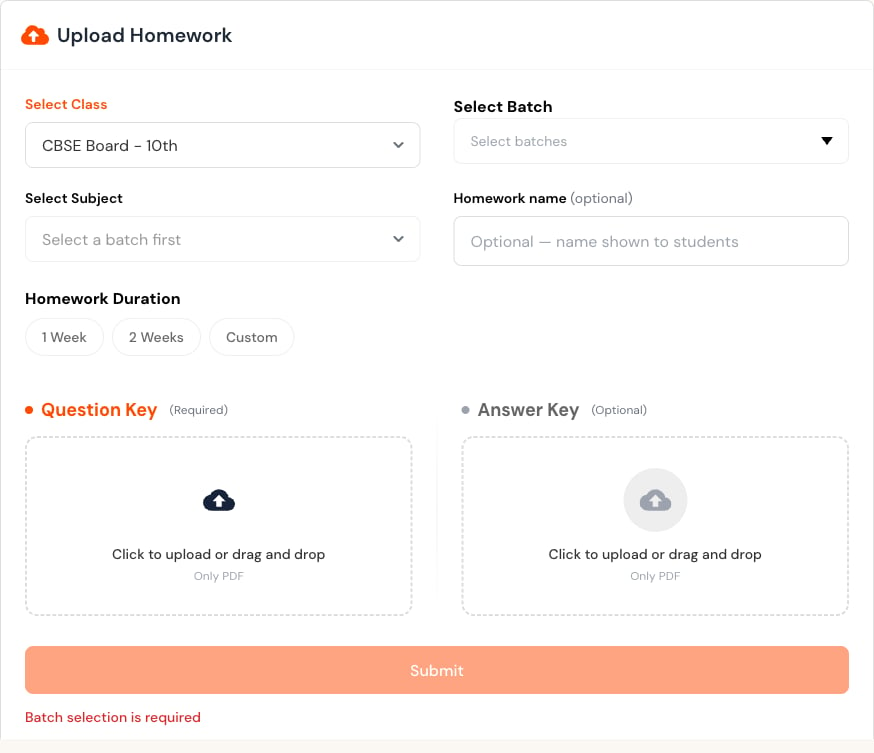 Submit once and wait for processing. Reopen the list to confirm the new status.
## Instructional ownership
Administrators provide oversight and recovery controls. Teachers remain responsible for instructional content, grading review, and result publication unless organizational policy explicitly assigns otherwise.
## Related topics
- [Administrator Guide](/admin-guide/overview.md)
- [Administrator First Steps](/getting-started/admin-registration-workflow.md)
- [Activity Logs](/admin-guide/activity-logs.md)
- [Section Management](/admin-guide/section-management.md)
- [Sections & Activity](/admin-guide/sections-and-activity.md)
Submit once and wait for processing. Reopen the list to confirm the new status.
## Instructional ownership
Administrators provide oversight and recovery controls. Teachers remain responsible for instructional content, grading review, and result publication unless organizational policy explicitly assigns otherwise.
## Related topics
- [Administrator Guide](/admin-guide/overview.md)
- [Administrator First Steps](/getting-started/admin-registration-workflow.md)
- [Activity Logs](/admin-guide/activity-logs.md)
- [Section Management](/admin-guide/section-management.md)
- [Sections & Activity](/admin-guide/sections-and-activity.md)