> ## Documentation Index
> Fetch the complete documentation index at: https://docs.aichanakya.in/llms.txt
> Use this file to discover all available pages before exploring further.
# Administrator Guide
> Manage organization capacity, people, sections, assessment oversight, activity, and support in the Chanakya AI administrator workspace.
# Administrator guide
Administrators maintain the organization structure and access that teachers and students depend on. Use the Admin workspace to monitor subscription capacity, manage accounts and sections, oversee assessment records, and verify important changes.
 ## Your workspace
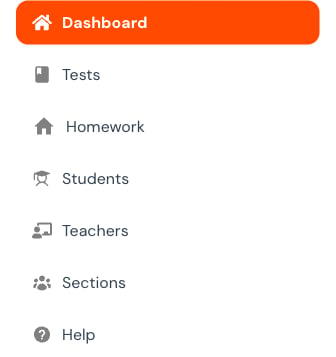
The primary navigation contains **Dashboard**, **Tests**, **Homework**, **Students**, **Teachers**, **Sections**, and **Help**. Feature availability can vary by organization and subscription.
## Your workspace
The primary navigation contains **Dashboard**, **Tests**, **Homework**, **Students**, **Teachers**, **Sections**, and **Help**. Feature availability can vary by organization and subscription.
 Review the active subscription, organization totals, usage, limits, and remaining capacity.
Search before creating, verify identity, maintain access, and avoid duplicate accounts.
Maintain roster dependencies and investigate operational events.
Filter tests and homework, review status, recover deleted work, and control permanent deletion.
## Admin responsibility map
| Area | Administrator owns | Verify afterward |
| ------------ | -------------------------------------------------- | ---------------------------------------------------- |
| Subscription | Capacity, utilization, renewal awareness | Correct subscription and remaining quota |
| People | Account creation, correction, reset, and removal | One correct record with intended access |
| Sections | Board, class, roster, and teaching relationships | Students, teachers, and subjects are connected |
| Assessments | Organization-level oversight and recovery controls | Status, submissions, and reporting remain consistent |
| Activity | Investigation of operational changes | Event and current record tell the same story |
## High-impact actions
Password resets, account deletion, section deletion, and permanent assessment deletion can affect another person's access or history. Before using one:
1. Confirm the exact target.
2. Check active work and reporting dependencies.
3. Use the smallest change that solves the problem.
4. Save once.
5. Reopen the record and review activity.
Never place passwords, answer sheets, private contact details, or full activity-log records in public support messages or screenshots.
## On a phone
Select the menu button at the top to open Admin navigation. The same role features are available in a stacked drawer. For long tables or complex configuration, a larger screen is easier to review before saving.
## Related topics
- [Administrator First Steps](/getting-started/admin-registration-workflow.md)
- [Welcome](/index.md)
- [Support & Account](/admin-guide/support-and-account.md)
- [Assessment Oversight](/admin-guide/assessment-oversight.md)
- [User Management](/admin-guide/user-management.md)
Review the active subscription, organization totals, usage, limits, and remaining capacity.
Search before creating, verify identity, maintain access, and avoid duplicate accounts.
Maintain roster dependencies and investigate operational events.
Filter tests and homework, review status, recover deleted work, and control permanent deletion.
## Admin responsibility map
| Area | Administrator owns | Verify afterward |
| ------------ | -------------------------------------------------- | ---------------------------------------------------- |
| Subscription | Capacity, utilization, renewal awareness | Correct subscription and remaining quota |
| People | Account creation, correction, reset, and removal | One correct record with intended access |
| Sections | Board, class, roster, and teaching relationships | Students, teachers, and subjects are connected |
| Assessments | Organization-level oversight and recovery controls | Status, submissions, and reporting remain consistent |
| Activity | Investigation of operational changes | Event and current record tell the same story |
## High-impact actions
Password resets, account deletion, section deletion, and permanent assessment deletion can affect another person's access or history. Before using one:
1. Confirm the exact target.
2. Check active work and reporting dependencies.
3. Use the smallest change that solves the problem.
4. Save once.
5. Reopen the record and review activity.
Never place passwords, answer sheets, private contact details, or full activity-log records in public support messages or screenshots.
## On a phone
Select the menu button at the top to open Admin navigation. The same role features are available in a stacked drawer. For long tables or complex configuration, a larger screen is easier to review before saving.
## Related topics
- [Administrator First Steps](/getting-started/admin-registration-workflow.md)
- [Welcome](/index.md)
- [Support & Account](/admin-guide/support-and-account.md)
- [Assessment Oversight](/admin-guide/assessment-oversight.md)
- [User Management](/admin-guide/user-management.md)