> ## Documentation Index
> Fetch the complete documentation index at: https://docs.aichanakya.in/llms.txt
> Use this file to discover all available pages before exploring further.
# Section Management
> Filter, create, assign, verify, edit, and remove sections without breaking academic access.
# Manage sections
Open **Sections** to filter by class and section, review roster totals, create a new section, or open row actions.

 The list shows section name, board, Student total, Teacher total, and actions.
 ## Create a section
Select **Create New Section**. Choose the board first, then the class. Enter a clear section name. The selected class determines available Students and subjects.
## Create a section
Select **Create New Section**. Choose the board first, then the class. Enter a clear section name. The selected class determines available Students and subjects.
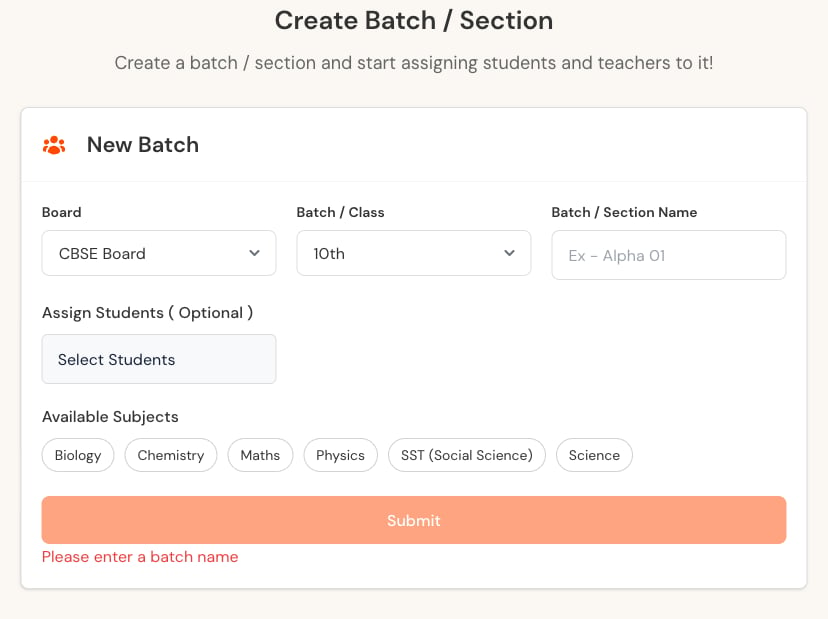 Use the organization's established naming pattern. Avoid creating a second section when a membership correction would solve the problem.
## Verify after saving
1. Reopen the section.
2. Confirm board, class, and section name.
3. Check Student membership.
4. Check Teacher and subject relationships.
5. Ask affected users to sign out and back in.
6. Confirm expected tests and homework remain visible.
## Row actions
* **View Students** opens the roster.
* **Edit** changes the section configuration.
* **Delete** removes the section only after confirmation.
Deleting a section can affect current access and historical reporting. Check active assessments and every dependency before proceeding.
## Related topics
- [Total Sections](/admin-tour-guide/dashboard-overview/key-metrics-cards/total-sections.md)
- [Student Management](/teacher-guide/batch-management/student-management.md)
- [User Management](/admin-guide/user-management.md)
- [Teacher Management](/admin-guide/teacher-management.md)
Use the organization's established naming pattern. Avoid creating a second section when a membership correction would solve the problem.
## Verify after saving
1. Reopen the section.
2. Confirm board, class, and section name.
3. Check Student membership.
4. Check Teacher and subject relationships.
5. Ask affected users to sign out and back in.
6. Confirm expected tests and homework remain visible.
## Row actions
* **View Students** opens the roster.
* **Edit** changes the section configuration.
* **Delete** removes the section only after confirmation.
Deleting a section can affect current access and historical reporting. Check active assessments and every dependency before proceeding.
## Related topics
- [Total Sections](/admin-tour-guide/dashboard-overview/key-metrics-cards/total-sections.md)
- [Student Management](/teacher-guide/batch-management/student-management.md)
- [User Management](/admin-guide/user-management.md)
- [Teacher Management](/admin-guide/teacher-management.md)