> ## Documentation Index
> Fetch the complete documentation index at: https://docs.aichanakya.in/llms.txt
> Use this file to discover all available pages before exploring further.
# AI Recommendations
> Use AI-generated study suggestions as focused next steps and confirm them against your assessment feedback.
# Use AI recommendations
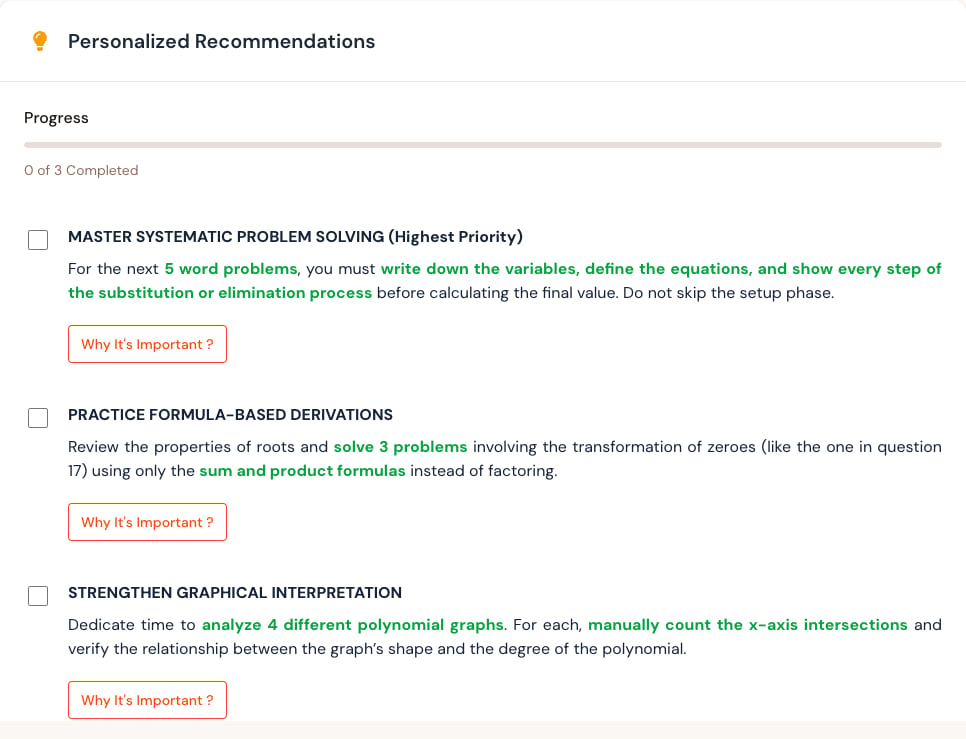
Recommendations can suggest topics, question types, or study actions based on available results.
 ## Recommended approach
1. Read the recommendation with the related result open.
2. Confirm that the cited weak area appears in your question feedback.
3. Choose a small, specific action.
4. Complete practice or ask your teacher for help.
5. Revisit the recommendation after new graded work.
## A useful recommendation is specific
Prefer “practice solving two-step linear equations and show every step” over “improve mathematics.” Turn broad suggestions into a small task that you can complete and check.
## When a recommendation looks wrong
Open the related result and inspect the questions behind it. A recommendation may have limited context when only a few assessments are graded or when recent work is still unpublished.
Ask your teacher when:
* The recommendation conflicts with the current syllabus.
* It references a topic you were not assessed on.
* The shown result does not support the suggestion.
* You need help choosing appropriate practice.
Recommendations support your learning plan; they do not replace teacher guidance. Ask your teacher when a suggestion conflicts with class instructions or the shown result.
## Related topics
- [Welcome](/index.md)
- [Filters & Analytics](/student-guide/dashboard-overview/filters-and-analytics.md)
- [Student First Steps](/getting-started/student-onboarding-workflow.md)
- [Quickstart](/quickstart.md)
- [Teacher Guide](/teacher-guide/overview.md)
## Recommended approach
1. Read the recommendation with the related result open.
2. Confirm that the cited weak area appears in your question feedback.
3. Choose a small, specific action.
4. Complete practice or ask your teacher for help.
5. Revisit the recommendation after new graded work.
## A useful recommendation is specific
Prefer “practice solving two-step linear equations and show every step” over “improve mathematics.” Turn broad suggestions into a small task that you can complete and check.
## When a recommendation looks wrong
Open the related result and inspect the questions behind it. A recommendation may have limited context when only a few assessments are graded or when recent work is still unpublished.
Ask your teacher when:
* The recommendation conflicts with the current syllabus.
* It references a topic you were not assessed on.
* The shown result does not support the suggestion.
* You need help choosing appropriate practice.
Recommendations support your learning plan; they do not replace teacher guidance. Ask your teacher when a suggestion conflicts with class instructions or the shown result.
## Related topics
- [Welcome](/index.md)
- [Filters & Analytics](/student-guide/dashboard-overview/filters-and-analytics.md)
- [Student First Steps](/getting-started/student-onboarding-workflow.md)
- [Quickstart](/quickstart.md)
- [Teacher Guide](/teacher-guide/overview.md)