> ## Documentation Index
> Fetch the complete documentation index at: https://docs.aichanakya.in/llms.txt
> Use this file to discover all available pages before exploring further.
# Exercise Results
> Review a published result, understand marks and question feedback, and decide what to study next.
# Review a result
A result can include total score, percentage, marks by question, answer feedback, and topic-level strengths or weaknesses.
 ## Read in this order
1. Check the total score and assessment details.
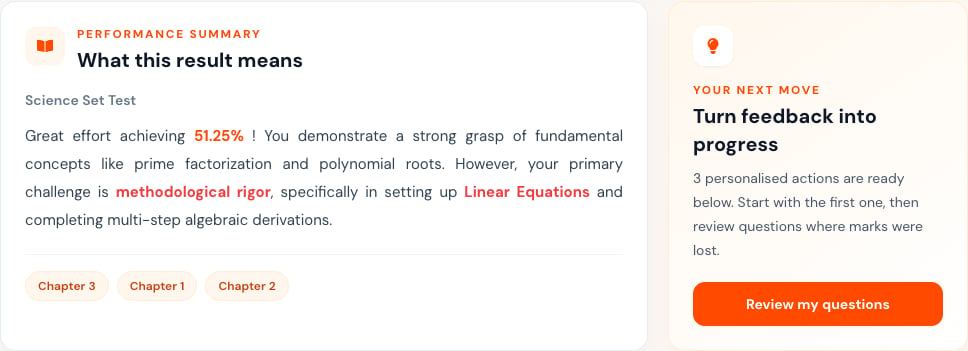
2. Read **What this result means** and the highlighted chapters.
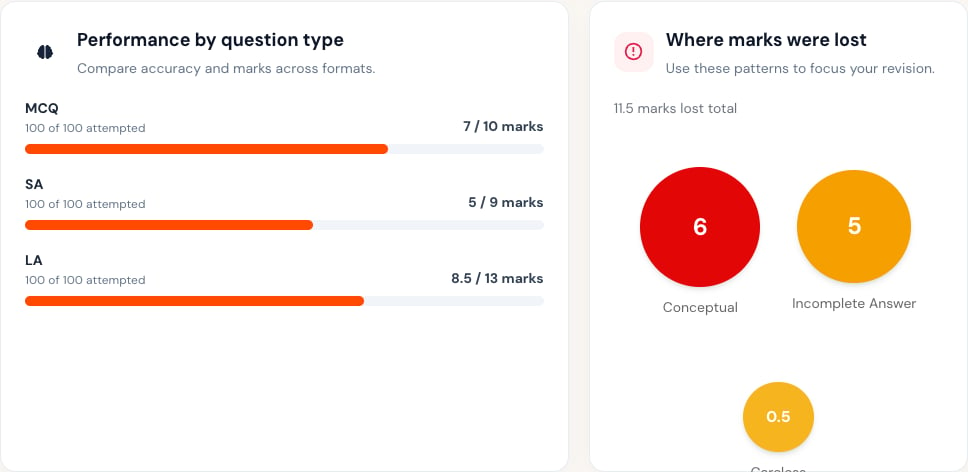
3. Review performance by question type and where marks were lost.
4. Open **Questions** to compare your response with the available feedback.
5. Use the personalized actions to plan revision.
## Read in this order
1. Check the total score and assessment details.
2. Read **What this result means** and the highlighted chapters.
3. Review performance by question type and where marks were lost.
4. Open **Questions** to compare your response with the available feedback.
5. Use the personalized actions to plan revision.
 ## When to ask for review
Contact your teacher when an uploaded answer is unreadable in the result, the wrong response appears, marks do not match the shown rubric, or feedback does not address your submitted work.
Give your teacher:
* The assessment title.
* The question number.
* The mark or feedback you expected to understand.
* A short explanation of the issue.
Do not post your full answer sheet or account details in a public channel.
## Turn feedback into action
Write down one concept to review, one error pattern to avoid, and one practice task to complete. Check the next comparable result for improvement instead of judging progress from a single score.
Results may remain unavailable until grading is complete and your teacher publishes them.
## Related topics
- [Exercise Management](/student-guide/exercise-management/overview.md)
- [Accessing Exercises](/student-guide/exercise-management/accessing-exercises.md)
- [Student Guide](/student-guide/overview.md)
- [Class Analysis](/teacher-guide/exercise-management/exercise-analytics.md)
- [AI Recommendations](/student-guide/performance-analysis/ai-recommendations.md)
## When to ask for review
Contact your teacher when an uploaded answer is unreadable in the result, the wrong response appears, marks do not match the shown rubric, or feedback does not address your submitted work.
Give your teacher:
* The assessment title.
* The question number.
* The mark or feedback you expected to understand.
* A short explanation of the issue.
Do not post your full answer sheet or account details in a public channel.
## Turn feedback into action
Write down one concept to review, one error pattern to avoid, and one practice task to complete. Check the next comparable result for improvement instead of judging progress from a single score.
Results may remain unavailable until grading is complete and your teacher publishes them.
## Related topics
- [Exercise Management](/student-guide/exercise-management/overview.md)
- [Accessing Exercises](/student-guide/exercise-management/accessing-exercises.md)
- [Student Guide](/student-guide/overview.md)
- [Class Analysis](/teacher-guide/exercise-management/exercise-analytics.md)
- [AI Recommendations](/student-guide/performance-analysis/ai-recommendations.md)