> ## Documentation Index
> Fetch the complete documentation index at: https://docs.aichanakya.in/llms.txt
> Use this file to discover all available pages before exploring further.
# Resources & Tools
> Find class resources, understand empty states, and use image-to-text tools when your organization enables them.
# Use resources and study tools
Resource availability depends on your organization, class, subject, and subscription. A page can be available even when no material has been assigned to your class.
## Find class resources
1. Open **Resources** when it is available.
2. Select a class.
3. Select a subject.
4. Open or download the available material.
 If no subjects are available, keep the selected class and ask your teacher whether resources have been assigned. Refreshing repeatedly will not create an assignment.
 ## Extract text from an image
The image-to-text workspace can accept uploaded images or included demo images. Extracted text appears in the panel on the right.
## Extract text from an image
The image-to-text workspace can accept uploaded images or included demo images. Extracted text appears in the panel on the right.
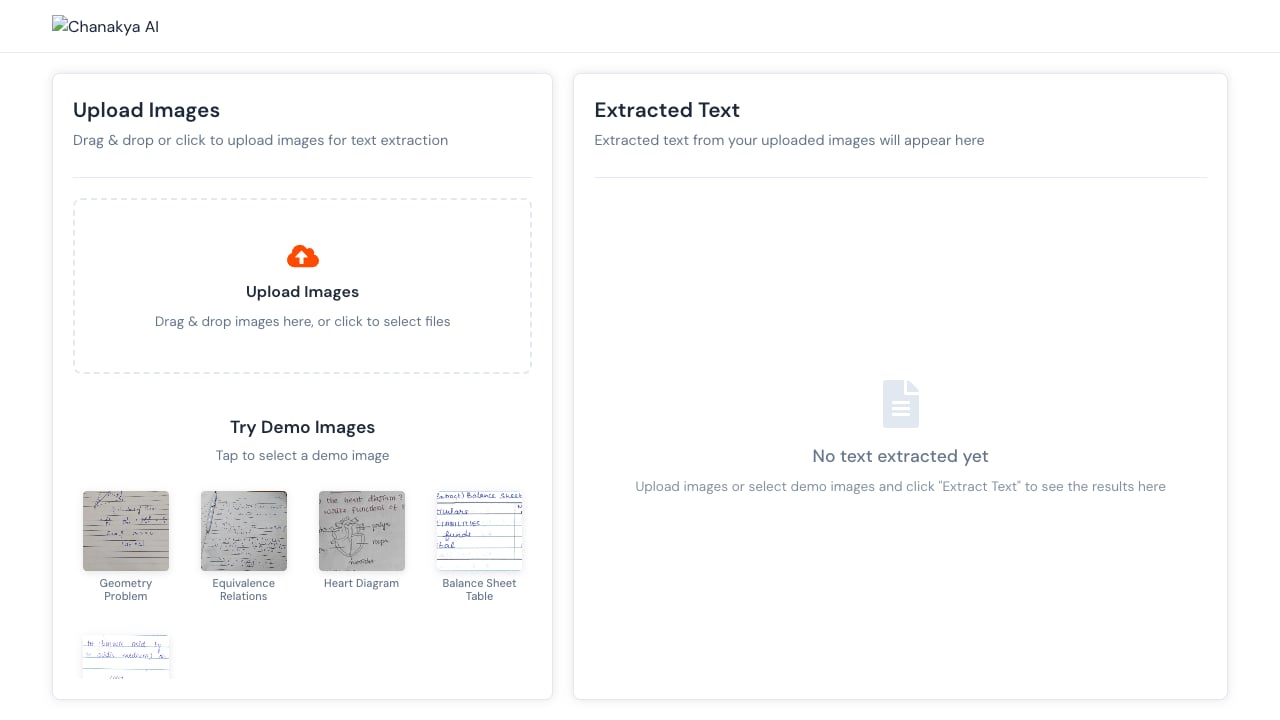 Use a clear, upright image with good lighting. Review the extracted text before copying it into notes because formulas, tables, and handwriting can be interpreted incorrectly.
Do not upload identity documents, passwords, private messages, or unrelated personal information.
## Related topics
- [Student Guide](/student-guide/overview.md)
- [License Management](/admin-tour-guide/dashboard-overview/key-metrics-cards/license-management.md)
- [Account & Security](/student-guide/account-and-security.md)
- [Teacher Guide](/teacher-guide/overview.md)
- [Dashboard Overview](/admin-tour-guide/dashboard-overview/overview.md)
Use a clear, upright image with good lighting. Review the extracted text before copying it into notes because formulas, tables, and handwriting can be interpreted incorrectly.
Do not upload identity documents, passwords, private messages, or unrelated personal information.
## Related topics
- [Student Guide](/student-guide/overview.md)
- [License Management](/admin-tour-guide/dashboard-overview/key-metrics-cards/license-management.md)
- [Account & Security](/student-guide/account-and-security.md)
- [Teacher Guide](/teacher-guide/overview.md)
- [Dashboard Overview](/admin-tour-guide/dashboard-overview/overview.md)