> ## Documentation Index
> Fetch the complete documentation index at: https://docs.aichanakya.in/llms.txt
> Use this file to discover all available pages before exploring further.
# Sections
> View assigned sections, subjects, counts, and privacy-sensitive rosters.
# Sections
Open **Sections** to view the teaching groups assigned to your account.
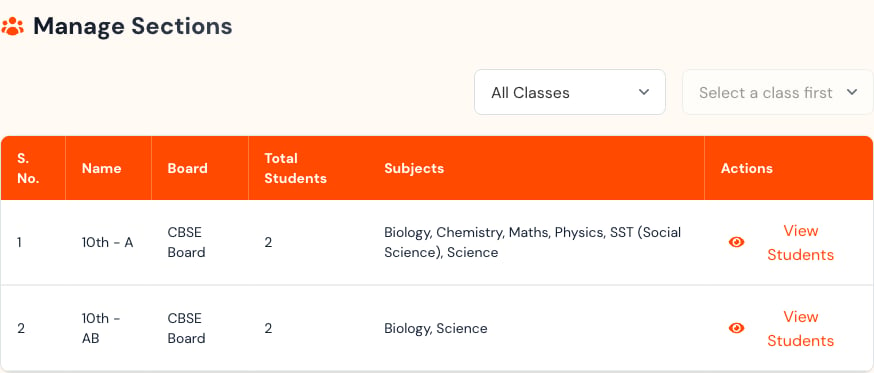
 Each row shows the section name, board, student count, assigned subjects, and **View Students** action.
 ## View the roster


 Use search to locate a learner. The roster is read-only in the Teacher workspace; contact an administrator if an assignment is incorrect.
Rosters include names, roll numbers, and usernames. Do not publish or share roster screenshots outside authorized channels.
## Related topics
- [Section Management](/admin-guide/section-management.md)
- [Total Sections](/admin-tour-guide/dashboard-overview/key-metrics-cards/total-sections.md)
- [Sections & Activity](/admin-guide/sections-and-activity.md)
- [Viewing Assigned Batches](/teacher-guide/batch-management/viewing-assigned-batches.md)
- [Student Management](/teacher-guide/batch-management/student-management.md)
Use search to locate a learner. The roster is read-only in the Teacher workspace; contact an administrator if an assignment is incorrect.
Rosters include names, roll numbers, and usernames. Do not publish or share roster screenshots outside authorized channels.
## Related topics
- [Section Management](/admin-guide/section-management.md)
- [Total Sections](/admin-tour-guide/dashboard-overview/key-metrics-cards/total-sections.md)
- [Sections & Activity](/admin-guide/sections-and-activity.md)
- [Viewing Assigned Batches](/teacher-guide/batch-management/viewing-assigned-batches.md)
- [Student Management](/teacher-guide/batch-management/student-management.md)