> ## Documentation Index
> Fetch the complete documentation index at: https://docs.aichanakya.in/llms.txt
> Use this file to discover all available pages before exploring further.
# Test List & Status
> Search and filter tests, interpret statuses, and use row actions safely.
# Test list and status
 ## Find a test
 Search by assessment name, subject, or section. Use filters from broad to narrow: **Class → Batch → Subject**, then **Test Type** and **Status**.
 ## Row actions
 * **Preview** — inspect the paper and exports.
* **View students** — review submission count, attempts, marks, and learner-level actions.
* **Class analysis** — open aggregate analysis after enough graded data exists.
* **More** — open state-dependent grading, editing, and deletion actions.
* **Preview** — inspect the paper and exports.
* **View students** — review submission count, attempts, marks, and learner-level actions.
* **Class analysis** — open aggregate analysis after enough graded data exists.
* **More** — open state-dependent grading, editing, and deletion actions.
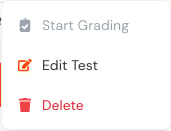 An unavailable action usually means a prerequisite is missing. For example, analysis requires graded submissions, and grading cannot start until eligible work exists.
## Mobile
An unavailable action usually means a prerequisite is missing. For example, analysis requires graded submissions, and grading cannot start until eligible work exists.
## Mobile
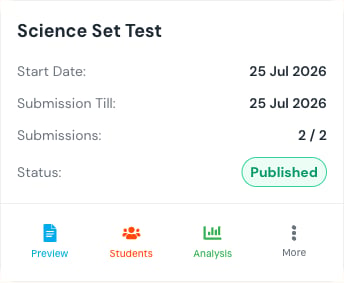 On mobile, each table row becomes a card. The actions and status meaning remain the same.
A deleted test may require an administrator to restore it. Do not delete work as a way to hide an incorrect result; review the result and use the supported correction workflow.
## Related topics
- [Accessing Exercises](/student-guide/exercise-management/accessing-exercises.md)
- [Tests & Homework](/teacher-guide/exercise-management/overview.md)
- [Assessment Oversight](/admin-guide/assessment-oversight.md)
- [Creating Tests](/teacher-guide/content-creation/creating-exercises.md)
- [Submitting Answers](/student-guide/exercise-management/submitting-answers.md)
On mobile, each table row becomes a card. The actions and status meaning remain the same.
A deleted test may require an administrator to restore it. Do not delete work as a way to hide an incorrect result; review the result and use the supported correction workflow.
## Related topics
- [Accessing Exercises](/student-guide/exercise-management/accessing-exercises.md)
- [Tests & Homework](/teacher-guide/exercise-management/overview.md)
- [Assessment Oversight](/admin-guide/assessment-oversight.md)
- [Creating Tests](/teacher-guide/content-creation/creating-exercises.md)
- [Submitting Answers](/student-guide/exercise-management/submitting-answers.md)