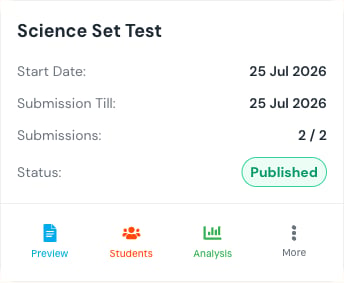
Test list and status

Manage Tests heading and New Test action.

Find a test

Test list search and filters for class, batch, subject, test type, and status. Search by assessment name, subject, or section. Use filters from broad to narrow: Class → Batch → Subject, then Test Type and Status. Test table columns for name, class, due date, submissions, status, and actions.

Row actions

Test row actions for Preview, View students, Class analysis, and More.
  • Preview — inspect the paper and exports.
  • View students — review submission count, attempts, marks, and learner-level actions.
  • Class analysis — open aggregate analysis after enough graded data exists.
  • More — open state-dependent grading, editing, and deletion actions.
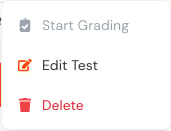
More actions menu with Start Grading, Edit Test, and Delete. An unavailable action usually means a prerequisite is missing. For example, analysis requires graded submissions, and grading cannot start until eligible work exists.

Mobile

Responsive test card with dates, submissions, status, and Preview, Students, Analysis, and More actions. On mobile, each table row becomes a card. The actions and status meaning remain the same.
A deleted test may require an administrator to restore it. Do not delete work as a way to hide an incorrect result; review the result and use the supported correction workflow.
Last modified on July 29, 2026