
Homework management

Find and monitor homework

Manage Homeworks heading and New Homework action. Homework search and filters for class, batch, subject, and status. Homework table columns for name, class, due date, submissions, status, and actions. Homework row with start and due dates, submissions, graded status, and actions. Homework rows include a start date and due date. Use Preview, View students, Class analysis, and More just as you would for tests; availability follows the homework status.

Upload homework

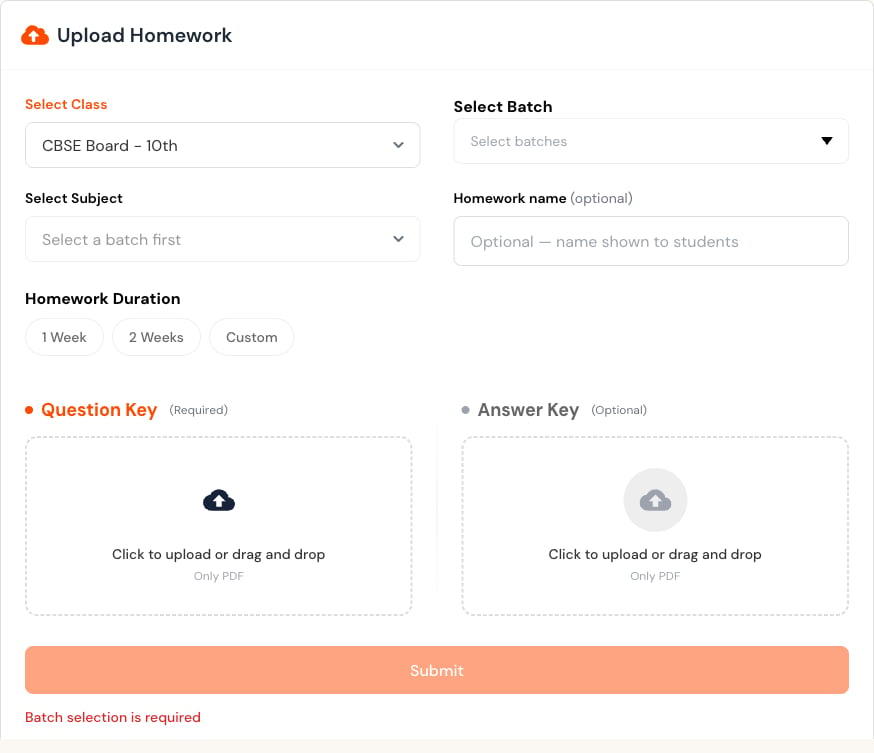
Select New Homework. Upload Homework form with class, batch, subject, optional name, duration, question key, and answer key.
1

Choose class and section

The section selection is required and determines available subjects.
2

Set subject and name

Use a clear optional name that learners can distinguish from other work.
3

Set the duration

Choose one week, two weeks, or a custom period.
4

Upload the PDFs

Add the required question key and an optional answer key, then submit.
Before uploading, check that the due date allows time for completion and that the PDF is readable on a phone.
Last modified on July 29, 2026


